SMS API ที่ปลอดภัย
Easy integration
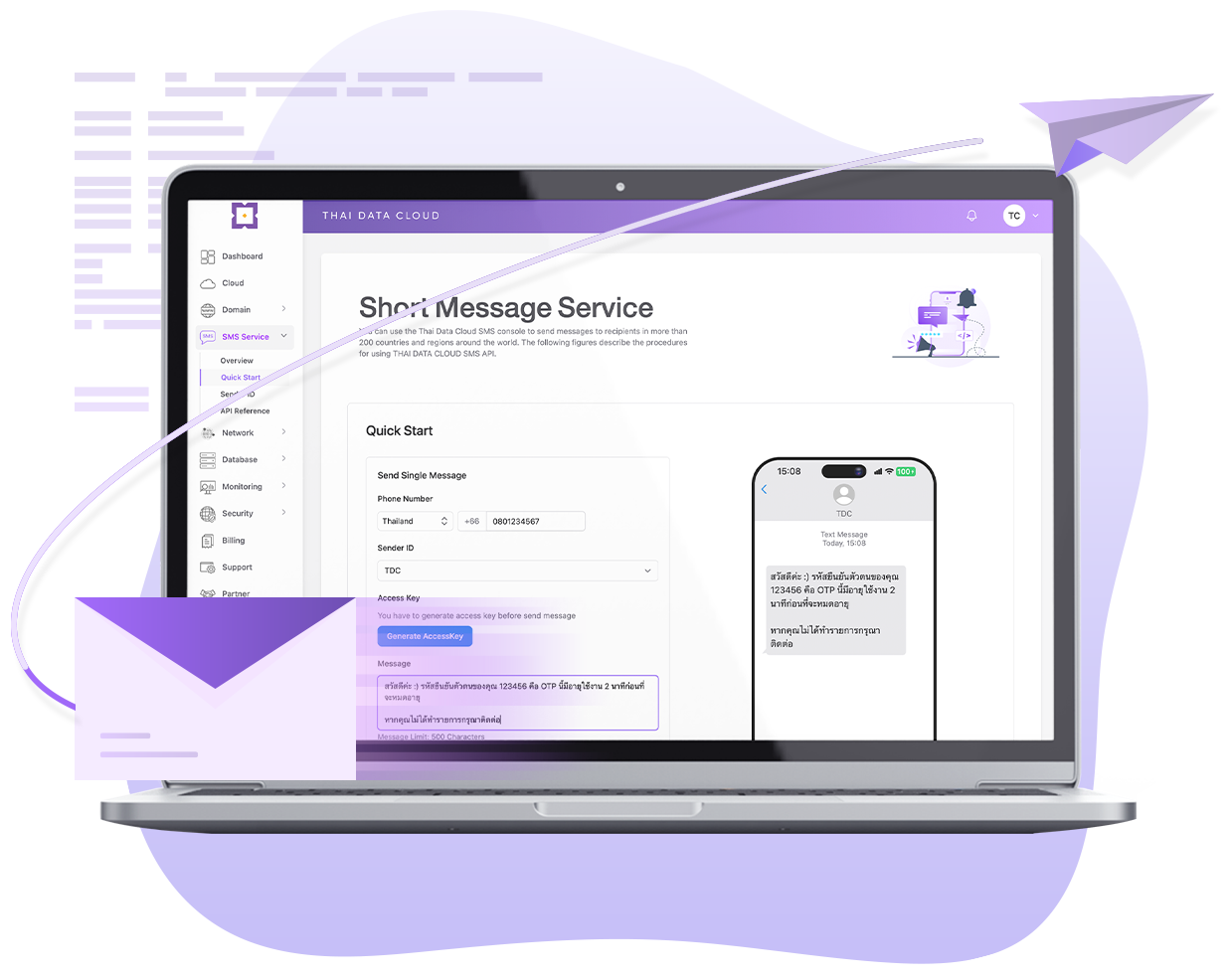
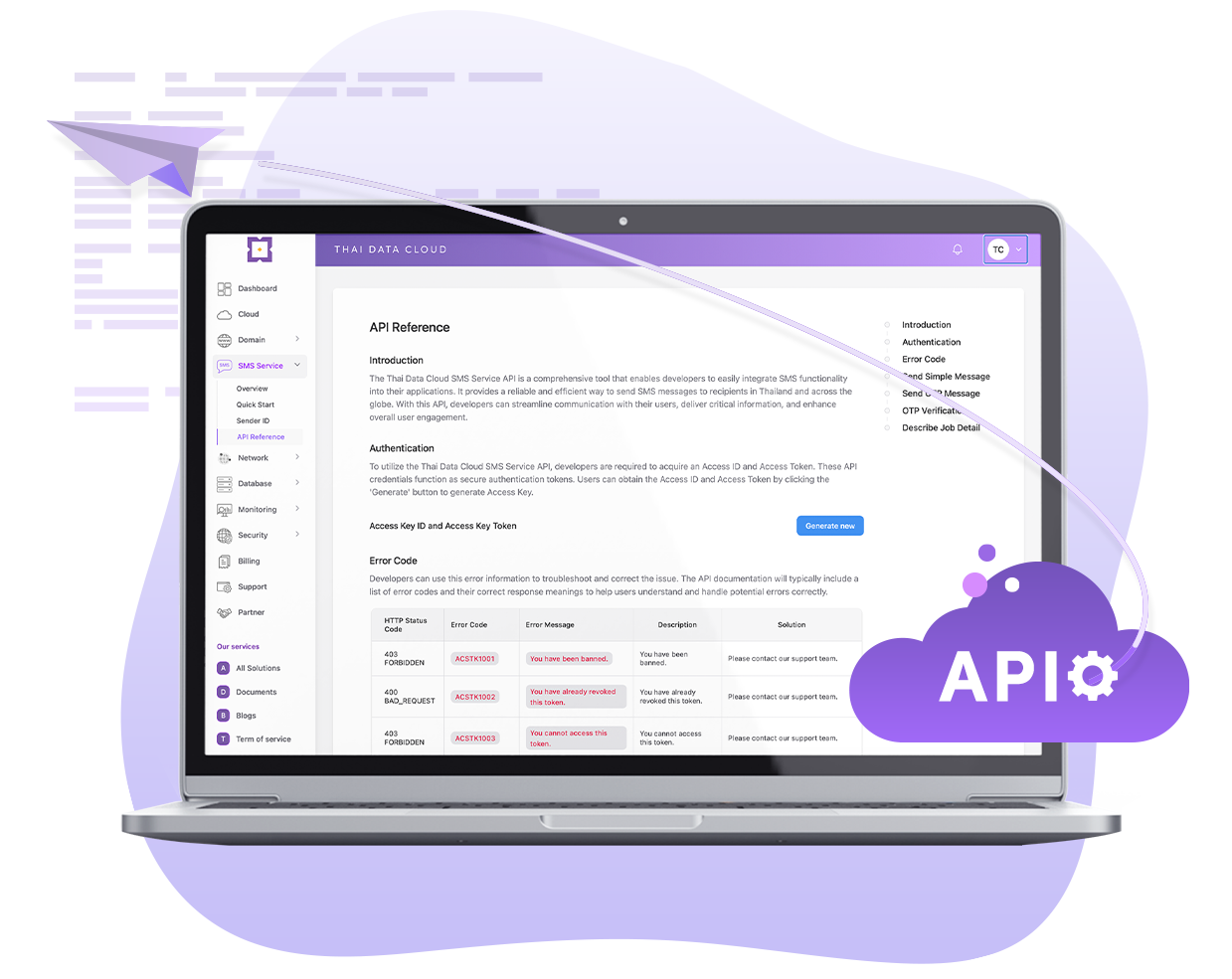
ระบบจะตรวจสอบโดยอัตโนมัติว่าใครเป็นผู้เรียกใช้ API เพิ่มความปลอดภัยและการมองเห็นสำหรับการเรียก API ทั้งหมด เพื่อให้แน่ใจว่ามีเพียงคุณเท่านั้นที่เรียกใช้ API ได้
SDKs และ APIs พร้อมใช้งานร่วมกับภาษาโปรแกรมเมอร์ต่างๆ ง่ายต่อการ Integrate ลดระยะเวลาและต้นทุนในการพัฒนาโปรแกรม
รายงานสถิติการส่งแบบเรียลไทม์
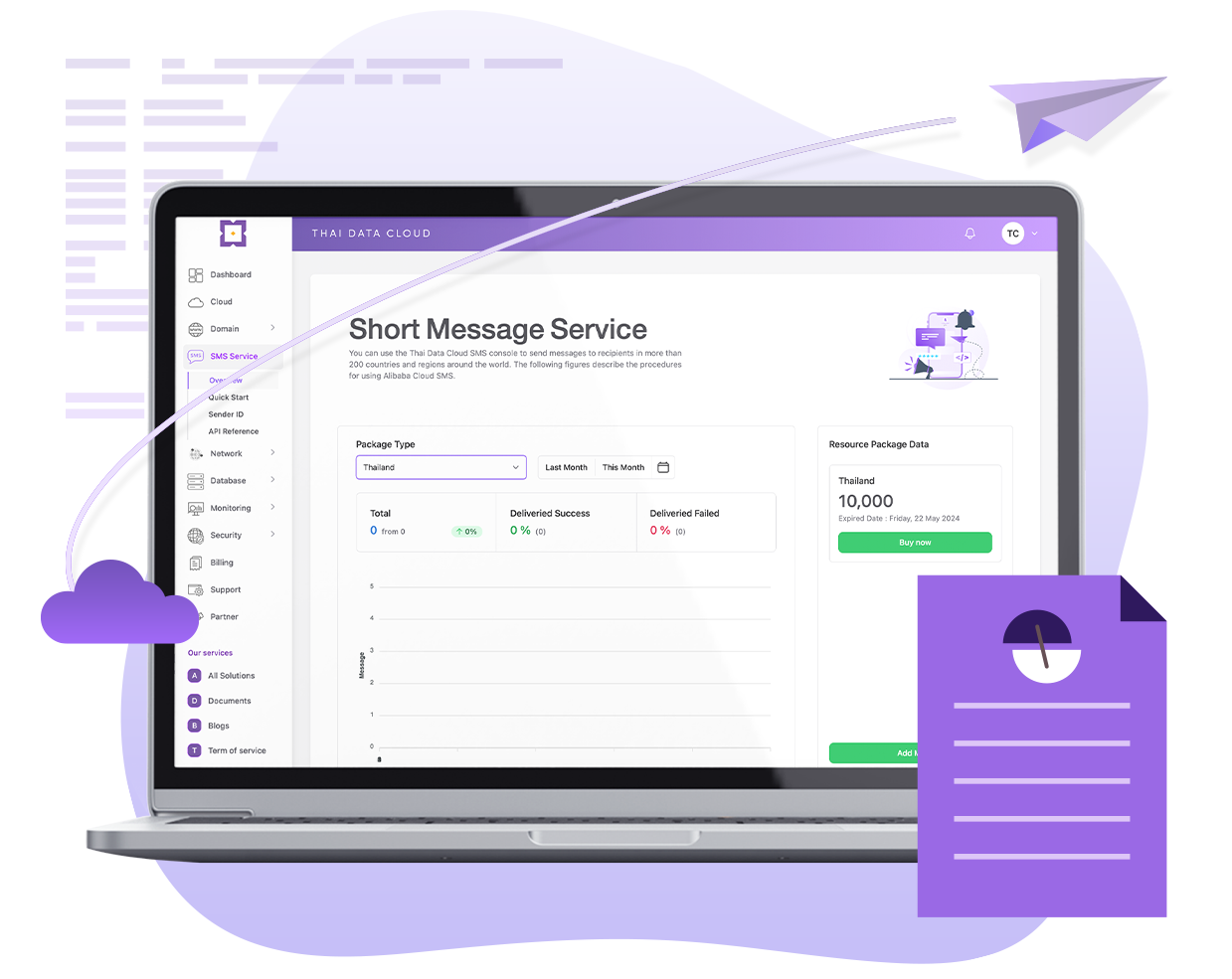
Real-time analytics
ระบบจัดทำแดชบอร์ดแสดงรายงานการส่งข้อความแบบเรียลไทม์
Instant File Upload - อัปโหลดไฟล์ทันที
Resumable Upload - หากการอัปโหลดหยุดชะงักสามารถอัปโหลดต่อเนื่องได้
Easy Share - แชร์ไฟล์ในองค์กรเดียวกันหรือแชร์ไฟล์กับผู้ใช้ภายนอกได้
Transfer Status Management - ระงับ ยกเลิก และจัดการสถานะอื่นๆ ได้
Our API Integrated Quick and Easy
เชื่อมต่อ API ได้อย่างรวดเร็ว
เริ่มส่งข้อความถึงลูกค้าของคุณวันนี้ด้วย SMS Service API ที่รวดเร็วและใช้งานง่ายและเอกสารเชิงลึกของเรา
API Documentation
Curl
Ruby
Python
PHP
Java
Node.js
.NET
Go
      curl -X 'POST' 'https://mooping-openapi.thaidata.cloud/v1.1/sms-simple'
      -H 'accept: */*'
      -H 'access-key-token: Access Key Token'
      -H 'access-key-id: Access Key Id'
      -H 'Content-Type: application/json'
      -d '{
      "phoneCode": "Client Phone Country Code",
      "phoneNumber": "Client Phone Number",
      "senderId": "Your Activate SenderId",
      "message": "Message Content"
    }'
      require 'net/http'
      require 'uri'
      require 'json'
      url = URI.parse('https://mooping-openapi.thaidata.cloud/v1.1/sms-simple')
      headers = {
        'accept' => '*/*',
        'access-key-token' => 'Access Key Token',
        'access-key-id' => 'Access Key Id',
        'Content-Type' => 'application/json'
      }
      data = {
        "phoneCode" => "Client Phone Country Code",
        "phoneNumber" => "Client Phone Number",
        "senderId" => "Your Activate SenderId",
        "message" => "Message Content"
      }
      http = Net::HTTP.new(url.host, url.port)
      http.use_ssl = (url.scheme == 'https')
      request = Net::HTTP::Post.new(url.path, headers)
      request.body = data.to_json
      response = http.request(request)
      puts "Response Code: #{response.code}"
      puts "Response Body: #{response.body}"
      import requests
      import json
      url = 'https://mooping-openapi.thaidata.cloud/v1.1/sms-simple'
      headers = {
          'accept': '*/*',
          'access-key-token': 'Access Key Token',
          'access-key-id': 'Access Key Id',
          'Content-Type': 'application/json'
      }
      data = {
          "phoneCode": "Client Phone Country Code",
          "phoneNumber": "Client Phone Number",
          "senderId": "Your Activate SenderId",
          "message": "Message Content"
      }
      response = requests.post(url, headers=headers, data=json.dumps(data))
      print(f"Response Code: {response.status_code}")
      print("Response Body:", response.text)
      <?php
      $url = 'https://mooping-openapi.thaidata.cloud/v1.1/sms-simple';
      $headers = array(
          'accept: */*',
          'access-key-token: Access Key Token',
          'access-key-id: Access Key Id',
          'Content-Type: application/json'
      );
      $data = array(
          "phoneCode" => "Client Phone Country Code",
          "phoneNumber" => "Client Phone Number",
          "senderId" => "Your Activate SenderId",
          "message" => "Message Content"
      );
      $ch = curl_init();
      curl_setopt($ch, CURLOPT_URL, $url);
      curl_setopt($ch, CURLOPT_HTTPHEADER, $headers);
      curl_setopt($ch, CURLOPT_RETURNTRANSFER, true);
      curl_setopt($ch, CURLOPT_POST, true);
      curl_setopt($ch, CURLOPT_POSTFIELDS, json_encode($data));
      $response = curl_exec($ch);
      if (curl_errno($ch)) {
          echo 'Error: ' . curl_error($ch);
      }
      curl_close($ch);
      echo "Response Code: " . http_response_code() . " ";
      echo "Response Body: " . $response . " ";
      ?>
      import java.io.BufferedReader;
      import java.io.DataOutputStream;
      import java.io.InputStreamReader;
      import java.net.HttpURLConnection;
      import java.net.URL;
      public class HttpClientExample {
          public static void main(String[] args) {
              try {
                  String url = "https://mooping-openapi.thaidata.cloud/v1.1/sms-simple";
                  URL obj = new URL(url);
                  HttpURLConnection connection = (HttpURLConnection) obj.openConnection();
                  // Set the HTTP POST method
                  connection.setRequestMethod("POST");
                  // Set request headers
                  connection.setRequestProperty("accept", "*/*");
                  connection.setRequestProperty("access-key-token", "Access Key Token");
                  connection.setRequestProperty("access-key-id", "Access Key Id");
                  connection.setRequestProperty("Content-Type", "application/json");
                  // Enable input/output streams
                  connection.setDoOutput(true);
                  connection.setDoInput(true);
                  // JSON data to send
                  String jsonData = "{" +
                          "phoneCode": "Client Phone Country Code"," +
                          "phoneNumber": "Client Phone Number"," +
                          "senderId": "Your Activate SenderId"," +
                          "message": "Message Content"" +
                          "}";
                  // Send POST data
                  try (DataOutputStream wr = new DataOutputStream(connection.getOutputStream())) {
                      wr.writeBytes(jsonData);
                      wr.flush();
                  }
                  int responseCode = connection.getResponseCode();
                  System.out.println("Response Code: " + responseCode);
                  BufferedReader in = new BufferedReader(new InputStreamReader(connection.getInputStream()));
                  String inputLine;
                  StringBuilder response = new StringBuilder();
                  while ((inputLine = in.readLine()) != null) {
                      response.append(inputLine);
                  }
                  in.close();
                  System.out.println("Response Body: " + response.toString());
              } catch (Exception e) {
                  e.printStackTrace();
              }
          }
      }
      const axios = require('axios');
      const url = 'https://mooping-openapi.thaidata.cloud/v1.1/sms-simple';
      const headers = {
        'accept': '*/*',
        'access-key-token': 'Access Key Token',
        'access-key-id': 'Access Key Id',
        'Content-Type': 'application/json'
      };
      const data = {
        "phoneCode": "Client Phone Country Code",
        "phoneNumber": "Client Phone Number",
        "senderId": "Your Activate SenderId",
        "message": "Message Content"
      };
      axios.post(url, data, { headers })
        .then(response => {
          console.log("Response Code:" , response.status);
          console.log("Response Body:", response.data);
        })
        .catch(error => {
          console.error(error);
        });
      using System;
      using System.Net.Http;
      using System.Text;
      using System.Threading.Tasks;
      class Program
      {
          static async Task Main()
          {
              string url = "https://mooping-openapi.thaidata.cloud/v1.1/sms-simple";
              var headers = new System.Net.Http.Headers.HttpRequestHeaders();
              headers.Add("accept", "*/*");
              headers.Add("access-key-token", "Access Key Token");
              headers.Add("access-key-id", "Access Key Id");
              headers.Add("Content-Type", "application/json");
              var data = new
              {
                  phoneCode = "Client Phone Country Code",
                  phoneNumber = "Client Phone Number",
                  senderId = "Your Activate SenderId",
                  message = "Message Content"
              };
              using (HttpClient client = new HttpClient())
              {
                  client.DefaultRequestHeaders.Clear();
                  client.DefaultRequestHeaders.AddHeaders(headers);
                  var jsonContent = new StringContent(Newtonsoft.Json.JsonConvert.SerializeObject(data), Encoding.UTF8, "application/json");
                  HttpResponseMessage response = await client.PostAsync(url, jsonContent);
                  Console.WriteLine($"Response Code: {(int)response.StatusCode} {response.ReasonPhrase}");
                  if (response.IsSuccessStatusCode)
                  {
                      string responseContent = await response.Content.ReadAsStringAsync();
                      Console.WriteLine("Response Body:");
                      Console.WriteLine(responseContent);
                  }
                  else
                  {
                      Console.WriteLine("Request failed.");
                  }
              }
          }
      }
      package main
      import (
          "bytes"
          "fmt"
          "net/http"
          "encoding/json"
      )
      func main() {
          url := "https://mooping-openapi.thaidata.cloud/v1.1/sms-simple"
          headers := map[string]string{
              "accept":           "*/*",
              "access-key-token": "Access Key Token",
              "access-key-id":    "Access Key Id",
              "Content-Type":     "application/json",
          }
          data := map[string]interface{}{
              "phoneCode":  "Client Phone Country Code",
              "phoneNumber": "Client Phone Number",
              "senderId":    "Your Activate SenderId",
              "message":     "Message Content",
          }
          jsonData, err := json.Marshal(data)
          if err != nil {
              fmt.Println("Error marshaling JSON data:", err)
              return
          }
          req, err := http.NewRequest("POST", url, bytes.NewBuffer(jsonData))
          if err != nil {
              fmt.Println("Error creating request:", err)
              return
          }
          for key, value := range headers {
              req.Header.Set(key, value)
          }
          client := &http.Client{}
          resp, err := client.Do(req)
          if err != nil {
              fmt.Println("Error sending request:", err)
              return
          }
          defer resp.Body.Close()
          fmt.Printf("Response Code: %d %s", resp.StatusCode, resp.Status)
          if resp.StatusCode == http.StatusOK {
              responseBody := new(bytes.Buffer)
              responseBody.ReadFrom(resp.Body)
              fmt.Println("Response Body:", responseBody.String())
          } else {
              fmt.Println("Request failed.")
          }
      }
      const axios = require('axios');
      const url = 'https://mooping-openapi.thaidata.cloud/v1.1/sms-simple';
      const headers = {
        'accept': '*/*',
        'access-key-token': 'Access Key Token',
        'access-key-id': 'Access Key Id',
        'Content-Type': 'application/json'
      };
      const data = {
        "phoneCode": "Client Phone Country Code",
        "phoneNumber": "Client Phone Number",
        "senderId": "Your Activate SenderId",
        "message": "Message Content"
      };
      axios.post(url, data, { headers })
        .then(response => {
          console.log("Response Code:" , response.status);
          console.log("Response Body:", response.data);
        })
        .catch(error => {
          console.error(error);
        });
      using System;
      using System.Net.Http;
      using System.Text;
      using System.Threading.Tasks;
      class Program
      {
          static async Task Main()
          {
              string url = "https://mooping-openapi.thaidata.cloud/v1.1/sms-simple";
              var headers = new System.Net.Http.Headers.HttpRequestHeaders();
              headers.Add("accept", "*/*");
              headers.Add("access-key-token", "Access Key Token");
              headers.Add("access-key-id", "Access Key Id");
              headers.Add("Content-Type", "application/json");
              var data = new
              {
                  phoneCode = "Client Phone Country Code",
                  phoneNumber = "Client Phone Number",
                  senderId = "Your Activate SenderId",
                  message = "Message Content"
              };
              using (HttpClient client = new HttpClient())
              {
                  client.DefaultRequestHeaders.Clear();
                  client.DefaultRequestHeaders.AddHeaders(headers);
                  var jsonContent = new StringContent(Newtonsoft.Json.JsonConvert.SerializeObject(data), Encoding.UTF8, "application/json");
                  HttpResponseMessage response = await client.PostAsync(url, jsonContent);
                  Console.WriteLine($"Response Code: {(int)response.StatusCode} {response.ReasonPhrase}");
                  if (response.IsSuccessStatusCode)
                  {
                      string responseContent = await response.Content.ReadAsStringAsync();
                      Console.WriteLine("Response Body:");
                      Console.WriteLine(responseContent);
                  }
                  else
                  {
                      Console.WriteLine("Request failed.");
                  }
              }
          }
      }
      package main
      import (
          "bytes"
          "fmt"
          "net/http"
          "encoding/json"
      )
      func main() {
          url := "https://mooping-openapi.thaidata.cloud/v1.1/sms-simple"
          headers := map[string]string{
              "accept":           "*/*",
              "access-key-token": "Access Key Token",
              "access-key-id":    "Access Key Id",
              "Content-Type":     "application/json",
          }
          data := map[string]interface{}{
              "phoneCode":  "Client Phone Country Code",
              "phoneNumber": "Client Phone Number",
              "senderId":    "Your Activate SenderId",
              "message":     "Message Content",
          }
          jsonData, err := json.Marshal(data)
          if err != nil {
              fmt.Println("Error marshaling JSON data:", err)
              return
          }
          req, err := http.NewRequest("POST", url, bytes.NewBuffer(jsonData))
          if err != nil {
              fmt.Println("Error creating request:", err)
              return
          }
          for key, value := range headers {
              req.Header.Set(key, value)
          }
          client := &http.Client{}
          resp, err := client.Do(req)
          if err != nil {
              fmt.Println("Error sending request:", err)
              return
          }
          defer resp.Body.Close()
          fmt.Printf("Response Code: %d %s", resp.StatusCode, resp.Status)
          if resp.StatusCode == http.StatusOK {
              responseBody := new(bytes.Buffer)
              responseBody.ReadFrom(resp.Body)
              fmt.Println("Response Body:", responseBody.String())
          } else {
              fmt.Println("Request failed.")
          }
      }
      curl -X 'POST' 'https://mooping-openapi.thaidata.cloud/v1.1/sms-simple'
      -H 'accept: */*'
      -H 'access-key-token: Access Key Token'
      -H 'access-key-id: Access Key Id'
      -H 'Content-Type: application/json'
      -d '{
      "phoneCode": "Client Phone Country Code",
      "phoneNumber": "Client Phone Number",
      "senderId": "Your Activate SenderId",
      "message": "Message Content"
    }'
      require 'net/http'
      require 'uri'
      require 'json'
      url = URI.parse('https://mooping-openapi.thaidata.cloud/v1.1/sms-simple')
      headers = {
        'accept' => '*/*',
        'access-key-token' => 'Access Key Token',
        'access-key-id' => 'Access Key Id',
        'Content-Type' => 'application/json'
      }
      data = {
        "phoneCode" => "Client Phone Country Code",
        "phoneNumber" => "Client Phone Number",
        "senderId" => "Your Activate SenderId",
        "message" => "Message Content"
      }
      http = Net::HTTP.new(url.host, url.port)
      http.use_ssl = (url.scheme == 'https')
      request = Net::HTTP::Post.new(url.path, headers)
      request.body = data.to_json
      response = http.request(request)
      puts "Response Code: #{response.code}"
      puts "Response Body: #{response.body}"
      import requests
      import json
      url = 'https://mooping-openapi.thaidata.cloud/v1.1/sms-simple'
      headers = {
          'accept': '*/*',
          'access-key-token': 'Access Key Token',
          'access-key-id': 'Access Key Id',
          'Content-Type': 'application/json'
      }
      data = {
          "phoneCode": "Client Phone Country Code",
          "phoneNumber": "Client Phone Number",
          "senderId": "Your Activate SenderId",
          "message": "Message Content"
      }
      response = requests.post(url, headers=headers, data=json.dumps(data))
      print(f"Response Code: {response.status_code}")
      print("Response Body:", response.text)
      <?php
      $url = 'https://mooping-openapi.thaidata.cloud/v1.1/sms-simple';
      $headers = array(
          'accept: */*',
          'access-key-token: Access Key Token',
          'access-key-id: Access Key Id',
          'Content-Type: application/json'
      );
      $data = array(
          "phoneCode" => "Client Phone Country Code",
          "phoneNumber" => "Client Phone Number",
          "senderId" => "Your Activate SenderId",
          "message" => "Message Content"
      );
      $ch = curl_init();
      curl_setopt($ch, CURLOPT_URL, $url);
      curl_setopt($ch, CURLOPT_HTTPHEADER, $headers);
      curl_setopt($ch, CURLOPT_RETURNTRANSFER, true);
      curl_setopt($ch, CURLOPT_POST, true);
      curl_setopt($ch, CURLOPT_POSTFIELDS, json_encode($data));
      $response = curl_exec($ch);
      if (curl_errno($ch)) {
          echo 'Error: ' . curl_error($ch);
      }
      curl_close($ch);
      echo "Response Code: " . http_response_code() . " ";
      echo "Response Body: " . $response . " ";
      ?>
      import java.io.BufferedReader;
      import java.io.DataOutputStream;
      import java.io.InputStreamReader;
      import java.net.HttpURLConnection;
      import java.net.URL;
      public class HttpClientExample {
          public static void main(String[] args) {
              try {
                  String url = "https://mooping-openapi.thaidata.cloud/v1.1/sms-simple";
                  URL obj = new URL(url);
                  HttpURLConnection connection = (HttpURLConnection) obj.openConnection();
                  // Set the HTTP POST method
                  connection.setRequestMethod("POST");
                  // Set request headers
                  connection.setRequestProperty("accept", "*/*");
                  connection.setRequestProperty("access-key-token", "Access Key Token");
                  connection.setRequestProperty("access-key-id", "Access Key Id");
                  connection.setRequestProperty("Content-Type", "application/json");
                  // Enable input/output streams
                  connection.setDoOutput(true);
                  connection.setDoInput(true);
                  // JSON data to send
                  String jsonData = "{" +
                          "phoneCode": "Client Phone Country Code"," +
                          "phoneNumber": "Client Phone Number"," +
                          "senderId": "Your Activate SenderId"," +
                          "message": "Message Content"" +
                          "}";
                  // Send POST data
                  try (DataOutputStream wr = new DataOutputStream(connection.getOutputStream())) {
                      wr.writeBytes(jsonData);
                      wr.flush();
                  }
                  int responseCode = connection.getResponseCode();
                  System.out.println("Response Code: " + responseCode);
                  BufferedReader in = new BufferedReader(new InputStreamReader(connection.getInputStream()));
                  String inputLine;
                  StringBuilder response = new StringBuilder();
                  while ((inputLine = in.readLine()) != null) {
                      response.append(inputLine);
                  }
                  in.close();
                  System.out.println("Response Body: " + response.toString());
              } catch (Exception e) {
                  e.printStackTrace();
              }
          }
      }
      const axios = require('axios');
      const url = 'https://mooping-openapi.thaidata.cloud/v1.1/sms-simple';
      const headers = {
        'accept': '*/*',
        'access-key-token': 'Access Key Token',
        'access-key-id': 'Access Key Id',
        'Content-Type': 'application/json'
      };
      const data = {
        "phoneCode": "Client Phone Country Code",
        "phoneNumber": "Client Phone Number",
        "senderId": "Your Activate SenderId",
        "message": "Message Content"
      };
      axios.post(url, data, { headers })
        .then(response => {
          console.log("Response Code:" , response.status);
          console.log("Response Body:", response.data);
        })
        .catch(error => {
          console.error(error);
        });
      using System;
      using System.Net.Http;
      using System.Text;
      using System.Threading.Tasks;
      class Program
      {
          static async Task Main()
          {
              string url = "https://mooping-openapi.thaidata.cloud/v1.1/sms-simple";
              var headers = new System.Net.Http.Headers.HttpRequestHeaders();
              headers.Add("accept", "*/*");
              headers.Add("access-key-token", "Access Key Token");
              headers.Add("access-key-id", "Access Key Id");
              headers.Add("Content-Type", "application/json");
              var data = new
              {
                  phoneCode = "Client Phone Country Code",
                  phoneNumber = "Client Phone Number",
                  senderId = "Your Activate SenderId",
                  message = "Message Content"
              };
              using (HttpClient client = new HttpClient())
              {
                  client.DefaultRequestHeaders.Clear();
                  client.DefaultRequestHeaders.AddHeaders(headers);
                  var jsonContent = new StringContent(Newtonsoft.Json.JsonConvert.SerializeObject(data), Encoding.UTF8, "application/json");
                  HttpResponseMessage response = await client.PostAsync(url, jsonContent);
                  Console.WriteLine($"Response Code: {(int)response.StatusCode} {response.ReasonPhrase}");
                  if (response.IsSuccessStatusCode)
                  {
                      string responseContent = await response.Content.ReadAsStringAsync();
                      Console.WriteLine("Response Body:");
                      Console.WriteLine(responseContent);
                  }
                  else
                  {
                      Console.WriteLine("Request failed.");
                  }
              }
          }
      }
      package main
      import (
          "bytes"
          "fmt"
          "net/http"
          "encoding/json"
      )
      func main() {
          url := "https://mooping-openapi.thaidata.cloud/v1.1/sms-simple"
          headers := map[string]string{
              "accept":           "*/*",
              "access-key-token": "Access Key Token",
              "access-key-id":    "Access Key Id",
              "Content-Type":     "application/json",
          }
          data := map[string]interface{}{
              "phoneCode":  "Client Phone Country Code",
              "phoneNumber": "Client Phone Number",
              "senderId":    "Your Activate SenderId",
              "message":     "Message Content",
          }
          jsonData, err := json.Marshal(data)
          if err != nil {
              fmt.Println("Error marshaling JSON data:", err)
              return
          }
          req, err := http.NewRequest("POST", url, bytes.NewBuffer(jsonData))
          if err != nil {
              fmt.Println("Error creating request:", err)
              return
          }
          for key, value := range headers {
              req.Header.Set(key, value)
          }
          client := &http.Client{}
          resp, err := client.Do(req)
          if err != nil {
              fmt.Println("Error sending request:", err)
              return
          }
          defer resp.Body.Close()
          fmt.Printf("Response Code: %d %s", resp.StatusCode, resp.Status)
          if resp.StatusCode == http.StatusOK {
              responseBody := new(bytes.Buffer)
              responseBody.ReadFrom(resp.Body)
              fmt.Println("Response Body:", responseBody.String())
          } else {
              fmt.Println("Request failed.")
          }
      }
      const axios = require('axios');
      const url = 'https://mooping-openapi.thaidata.cloud/v1.1/sms-simple';
      const headers = {
        'accept': '*/*',
        'access-key-token': 'Access Key Token',
        'access-key-id': 'Access Key Id',
        'Content-Type': 'application/json'
      };
      const data = {
        "phoneCode": "Client Phone Country Code",
        "phoneNumber": "Client Phone Number",
        "senderId": "Your Activate SenderId",
        "message": "Message Content"
      };
      axios.post(url, data, { headers })
        .then(response => {
          console.log("Response Code:" , response.status);
          console.log("Response Body:", response.data);
        })
        .catch(error => {
          console.error(error);
        });
      using System;
      using System.Net.Http;
      using System.Text;
      using System.Threading.Tasks;
      class Program
      {
          static async Task Main()
          {
              string url = "https://mooping-openapi.thaidata.cloud/v1.1/sms-simple";
              var headers = new System.Net.Http.Headers.HttpRequestHeaders();
              headers.Add("accept", "*/*");
              headers.Add("access-key-token", "Access Key Token");
              headers.Add("access-key-id", "Access Key Id");
              headers.Add("Content-Type", "application/json");
              var data = new
              {
                  phoneCode = "Client Phone Country Code",
                  phoneNumber = "Client Phone Number",
                  senderId = "Your Activate SenderId",
                  message = "Message Content"
              };
              using (HttpClient client = new HttpClient())
              {
                  client.DefaultRequestHeaders.Clear();
                  client.DefaultRequestHeaders.AddHeaders(headers);
                  var jsonContent = new StringContent(Newtonsoft.Json.JsonConvert.SerializeObject(data), Encoding.UTF8, "application/json");
                  HttpResponseMessage response = await client.PostAsync(url, jsonContent);
                  Console.WriteLine($"Response Code: {(int)response.StatusCode} {response.ReasonPhrase}");
                  if (response.IsSuccessStatusCode)
                  {
                      string responseContent = await response.Content.ReadAsStringAsync();
                      Console.WriteLine("Response Body:");
                      Console.WriteLine(responseContent);
                  }
                  else
                  {
                      Console.WriteLine("Request failed.");
                  }
              }
          }
      }
      package main
      import (
          "bytes"
          "fmt"
          "net/http"
          "encoding/json"
      )
      func main() {
          url := "https://mooping-openapi.thaidata.cloud/v1.1/sms-simple"
          headers := map[string]string{
              "accept":           "*/*",
              "access-key-token": "Access Key Token",
              "access-key-id":    "Access Key Id",
              "Content-Type":     "application/json",
          }
          data := map[string]interface{}{
              "phoneCode":  "Client Phone Country Code",
              "phoneNumber": "Client Phone Number",
              "senderId":    "Your Activate SenderId",
              "message":     "Message Content",
          }
          jsonData, err := json.Marshal(data)
          if err != nil {
              fmt.Println("Error marshaling JSON data:", err)
              return
          }
          req, err := http.NewRequest("POST", url, bytes.NewBuffer(jsonData))
          if err != nil {
              fmt.Println("Error creating request:", err)
              return
          }
          for key, value := range headers {
              req.Header.Set(key, value)
          }
          client := &http.Client{}
          resp, err := client.Do(req)
          if err != nil {
              fmt.Println("Error sending request:", err)
              return
          }
          defer resp.Body.Close()
          fmt.Printf("Response Code: %d %s", resp.StatusCode, resp.Status)
          if resp.StatusCode == http.StatusOK {
              responseBody := new(bytes.Buffer)
              responseBody.ReadFrom(resp.Body)
              fmt.Println("Response Body:", responseBody.String())
          } else {
              fmt.Println("Request failed.")
          }
      }
Efficiency and stability มีความน่าเชื่อถือ ให้บริการแบบ Operation and Maintenance (O&M) จัดส่งข้อความได้ทั่วโลก ติดตามผลการส่งได้แบบ Real-time
Easy integration SDKs และ APIs พร้อมใช้งานร่วมกับภาษาโปรแกรมเมอร์ต่างๆ ง่ายต่อการ Integrate ลดระยะเวลาและต้นทุนในการพัฒนาโปรแกรม
High performance รองรับการตั้งเวลาส่งอัจฉริยะ (Schedule Campaign) ข้อความจะถูกส่งไปยังปลายทางด้วยอัตราความสำเร็จสูง แม้ในช่วงเวลาเร่งด่วน
Messaging analytics อัลกอริทึม AI เพื่อเพิ่มประสิทธิภาพ ได้รับข้อมูลเชิงลึกในการส่งข้อความเพื่อการตัดสินใจทางธุรกิจรวมถึงการวิจัยการตลาดอย่างชาญฉลาด
Global Coverage
ช่องทางการสื่อสารที่มีประสิทธิภาพระหว่างองค์กรและลูกค้าครอบคลุม 200 ประเทศทั่วโลก
ทดลองส่งข้อความฟรี